
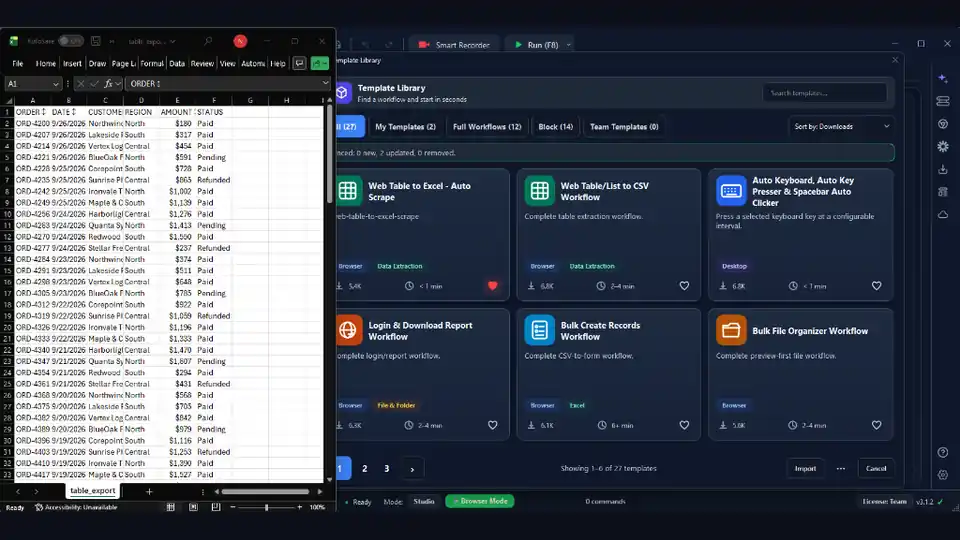

Copying information off a website by hand — prices, listings, contacts, search results — is slow, mind-numbing, and quietly full of errors. The moment you need the same data from a hundred pages, or the same report every morning, it stops being a task and becomes a bottleneck.
Web data extraction with RunMacro turns that bottleneck into a workflow: it opens each page, reads exactly the elements you care about, and writes the results to Excel or Google Sheets — all without a single line of code. This guide walks through how to build one that actually holds up in production.
Why automate extraction instead of copy-pasting?
Manual collection does not scale and it is not consistent. Two people copying the same table will format it two different ways, and a tired person at 5 p.m. will miss a row. A workflow does the same thing the same way every time, runs unattended, and can be scheduled to refresh your data overnight. The real win is not just speed — it is trustworthy, repeatable output you can build reports on.
It also changes what is even worth collecting. When a tested workflow can collect hundreds of rows unattended, larger recurring datasets become practical to track: a competitor's daily prices, a directory that changes weekly, a search that needs re-running every morning.
What you can extract
Most page content maps cleanly onto a field you can read into a variable:
• Text values — names, prices, descriptions, dates, statuses.
• Tables and lists — read a repeating row structure item by item in a loop.
• Links and URLs — pull the href of a listing so a second pass can visit each detail page.
• Images — save them with Download images when you need the picture, not just its address.
• A whole-page snapshot — capture the rendered page with Screenshot for an audit trail or visual record.
What sits outside this: content behind a login you are not permitted to automate, data a site's terms forbid collecting, and anything gated by a CAPTCHA. Those are boundaries to respect, not obstacles to defeat.
Step 1 — Target elements the reliable way
The single biggest factor in whether a scraper survives is how it finds things on the page. Clicking fixed screen coordinates breaks the moment the layout moves. RunMacro's Smart HTML instead reads and clicks elements by their selector — the underlying structure of the page — so it keeps working after redesigns and across screen sizes. Pick the element once with the built-in picker and RunMacro remembers how to find it.
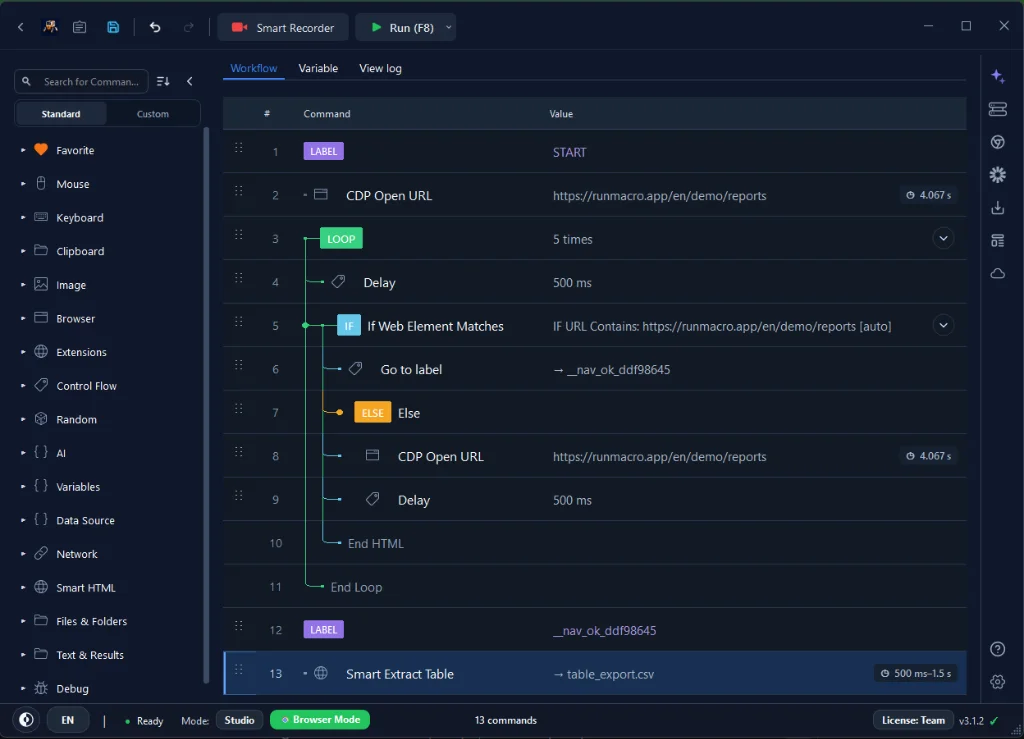
Two companions make this robust:
• Wait for element — pause until the content has actually loaded rather than racing an empty page.
• IF element — branch when a field is missing (skip a product with no price instead of crashing the run).
Prefer selectors tied to meaningful structure over auto-generated class names that change on every deploy; a selector anchored to a stable label outlives a redesign that a random hashed class name will not.
Step 2 — Run Chrome in the background
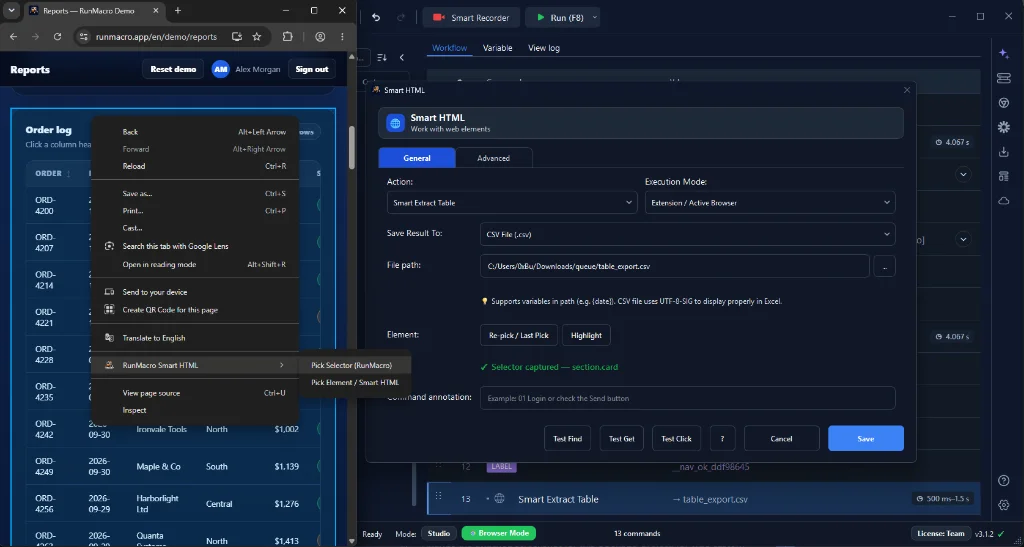
Extraction almost always runs in Background mode (Chrome/CDP). RunMacro drives Chrome through the DevTools Protocol, which means it reads the live DOM directly and never takes over your physical mouse — you start the crawl and keep working.
Navigate with Open URL, spread work across tabs using New Tab and Switch Tab, and call Reload when a page needs a refresh.
Because it reads the rendered DOM rather than raw HTML, it handles pages whose content is drawn by JavaScript after load — the kind that returns an empty document to a simple HTTP fetch. That is the main reason a browser-driven crawl succeeds where a naive request-based scraper returns nothing.
Step 3 — Read fields into variables and clean them
Read each field into a named variable with Declare Variable, so productPrice and productName are obvious downstream rather than anonymous slots. Scraped text is rarely export-ready, so clean it in the same pass:
• Strip a currency symbol or stray whitespace with Clean Text.
• Pull one piece out of a longer string — a number from "In stock: 42 left", an ID from a URL — with Extract with Regex.
By the time a value reaches the export step it is already the exact string you want in the sheet.
Step 4 — Handle pagination and dynamic content
Real sites rarely put everything on one page. The standard pattern is a Loop: read every item on the current page, then either click the Next button or open the next page URL, and repeat. Use a Label and a condition so the loop stops cleanly when the Next button disappears rather than running forever. When the site paginates by URL — ?page=2, ?page=3 — incrementing the number is often simpler and more robust than hunting for a Next button.
For pages that load more items as you scroll, or behind a "Load more" button, add a short wait after each scroll or click so new rows have time to appear before you read them. Patience here is what separates a complete dataset from a half-empty one — reading before the content arrives is the most common reason a crawl silently misses rows.
Step 5 — Export to Excel or Google Sheets
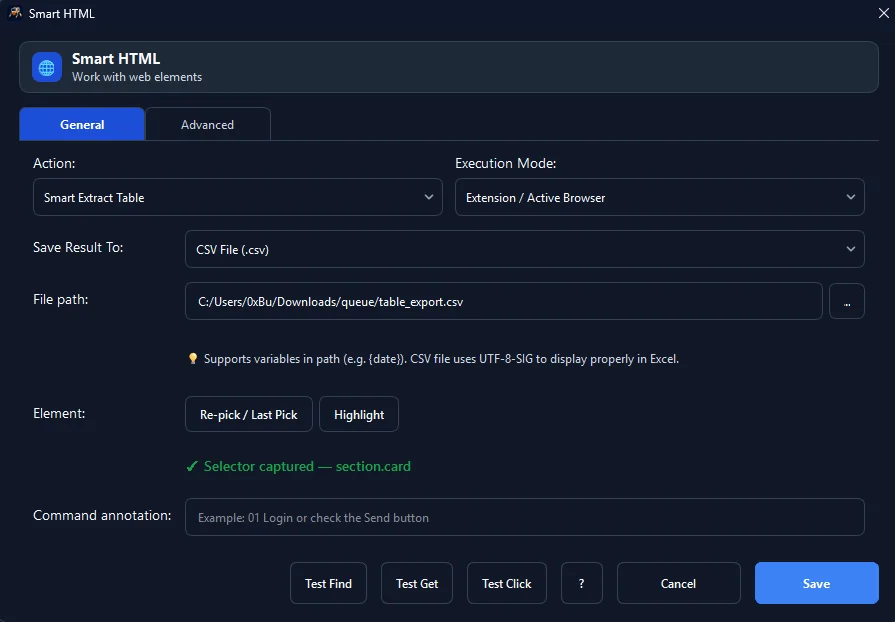
Once the values are in variables, write them out immediately rather than holding everything in memory. Append CSV Row builds a spreadsheet one row at a time, which also means a crash halfway through still leaves you the rows collected so far. If your team lives in the cloud, Google Sheets pushes each record straight into a shared sheet that updates in real time. Writing as you go, not at the end, is the habit that saves long runs.
Scrape on a schedule
The clearest payoff of an unattended crawl is a dataset that refreshes itself. Hand the workflow to the Scheduler to run it every morning or overnight, and add a Telegram notification at the end so you know the fresh data landed — or that a run needs a look. Combined with write-as-you-go export, a scheduled crawl keeps a live sheet current with no one at the keyboard.
A complete example workflow
Here is the shape of a production-ready extractor:
1. OPEN URL "https://example.com/catalog"
2. WAIT FOR ELEMENT "#product-list"
3. IF ELEMENT "#product-list" NOT FOUND → JUMP TO END
4. LOOP:
     title  = SMART HTML READ ".title"
     price  = SMART HTML READ ".price" → CLEAN TEXT
     link   = SMART HTML READ "a.detail-link" → GET href
     APPEND CSV ROW [title, price, link]
     CLICK NEXT BUTTON
     DELAY (random 1–3s)
     IF NEXT BUTTON GONE → END LOOP
5. LOG "Extraction complete" + row count
Each step maps directly to a RunMacro command — no scripting required.
Keep it reliable and respectful
A scraper that runs once is easy; one that runs for months needs care. Add a small Random Delay after every navigation so pages settle and requests stay human-paced. Log progress — even a simple line per page — so when a run stops you know exactly where.
Just as important is where the line sits. Respect each site's terms of service and its robots rules, space your requests out rather than hammering the server, and do not collect personal data or content you are not permitted to. Do not try to get past a login you are not authorized to use or a CAPTCHA a site put up to stop automation. Slower, human-paced, in-bounds extraction is not only more responsible — it is also far less likely to get your automation blocked.
Troubleshooting
| Problem | Solution |
|---|---|
| Run finishes but file is empty | The read step is racing the page. Add or lengthen a Wait for element on the data container; confirm the selector matches an element that exists once the page is fully drawn. |
| Only the first page was collected | Pagination loop is not advancing. Check that the Next click targets the real button, the loop returns to the read step, and the stop condition only fires when Next is genuinely gone. |
| A missing field stops the run | Wrap that read in an IF element so a missing price or image is logged and skipped instead of halting the crawl. |
| Values have extra symbols or whitespace | Clean each value with Clean Text or extract just the part you need with Extract with Regex before export. |
| Site returns blocks or errors | Requesting too fast. Increase delay between pages, reduce parallel tabs, and confirm you are within the site's terms. |
Frequently asked questions
How do I extract data from a web page without code?
Pick elements with the visual selector picker, read them into variables with Smart HTML, loop over pages, and export with Append CSV Row or Google Sheets. No scripting is required.
Will the scraper break when the website changes?
Much less than a coordinate-based one. Smart HTML targets elements by selector, so it survives most layout changes; if a site is redesigned heavily, you re-pick the affected element.
Can it export straight to Google Sheets?
Yes. Use the Google Sheets action to push each record into a shared sheet, or Append CSV Row for a local spreadsheet.
Does it work on sites that load content with JavaScript?
Yes. Because it reads the rendered DOM in real Chrome, it sees content drawn after load — the kind a simple HTTP request returns empty. Add a wait so the dynamic content is present before you read.
Can it download images, not just text?
Yes. Use Download images to save the files, or read an image's URL into a variable if you only need the address.
Can it run on a schedule?
Yes. Use the Scheduler to refresh the data overnight or every morning, and add a Telegram notification so you know each run finished.
Is web scraping allowed?
Respect each site's terms of service and rate limits, avoid personal or login-gated data, and space out requests. Responsible, human-paced, in-bounds extraction is both more ethical and less likely to be blocked.
Is RunMacro free?
RunMacro offers a free trial. Current plan limits and pricing are listed on the pricing page.
Where to go next
Start with a single page and a handful of fields, confirm the export looks right, then add the pagination loop. Once the pattern works, the same workflow scales to thousands of records with no extra effort.
