
Docs
RunMacro Documentation
Create your first robot, then go further as needed.
Clear step-by-step guides to create, run, and improve robots for repetitive computer work.
Loop: repeat a block N times in RunMacro
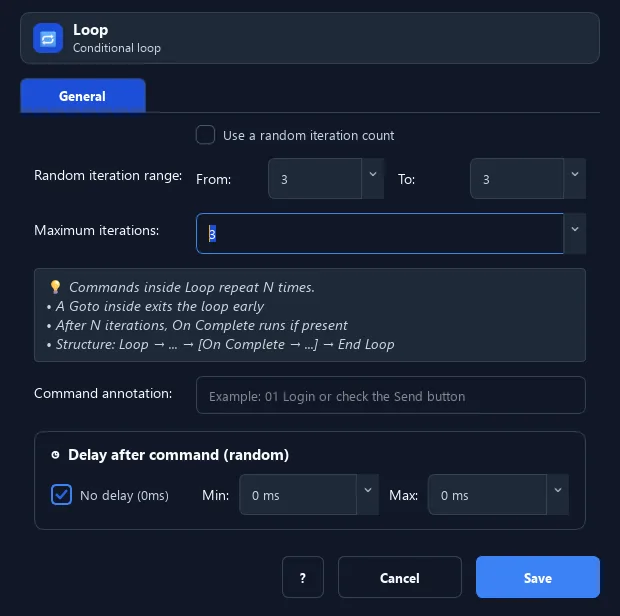
The Loop command is a special IF block: it repeats the commands below until it reaches a set number of iterations (fixed or random).
Prerequisites#
- Add Loop to the macro.
- Prepare the data or target that Loop will use.
Supported modes#
- RunMacro Runner
What it does#
The Loop command is a special IF block: it repeats the commands below until it reaches a set number of iterations (fixed or random). The block is closed with an End If command, and the optional Else branch runs after exhaustion before continuing. A Goto can exit early without running that branch.
Screenshots & video#
When to use it#
- Repeat an action exactly N times (e.g. send 10 messages).
- Loop a random number of times when you need the count to vary between runs.
- Retry a sequence a bounded number of times instead of endlessly.
When not to use it#
- Do not use Loop when repetition should stop on a changing condition; test that condition instead of using a fixed count.
Configuration steps#
- Add a Flow › Loop command.
- Choose a fixed iteration count, or enable random and set a min–max range.
- Put the commands to repeat below, then close the block with an End If command.
- (Optional) add an Else branch for what runs after normal exhaustion. Save.
Every option explained#
Expected result#
After execution, Loop completes the described action and makes its result available to the next step.
Real example#
Example: repeat sending a message 5 times#
- Loop with count = 5.
- Inside: Type Text + Press Enter.
- Close with End If. After 5 iterations, the script continues below.
Limitations and failure cases#
- The runner manages the counter and the block must close correctly with End If; a Goto out of the block can bypass normal completion.
Tips & common mistakes#
Use a Goto inside the loop to exit early when a stop condition is met.
The loop counter resets automatically when it finishes or the macro restarts.
Verification details#
commands/control_flow.py
