
Docs
RunMacro Documentation
Create your first robot, then go further as needed.
Clear step-by-step guides to create, run, and improve robots for repetitive computer work.
Append the run result to a CSV/TXT in RunMacro
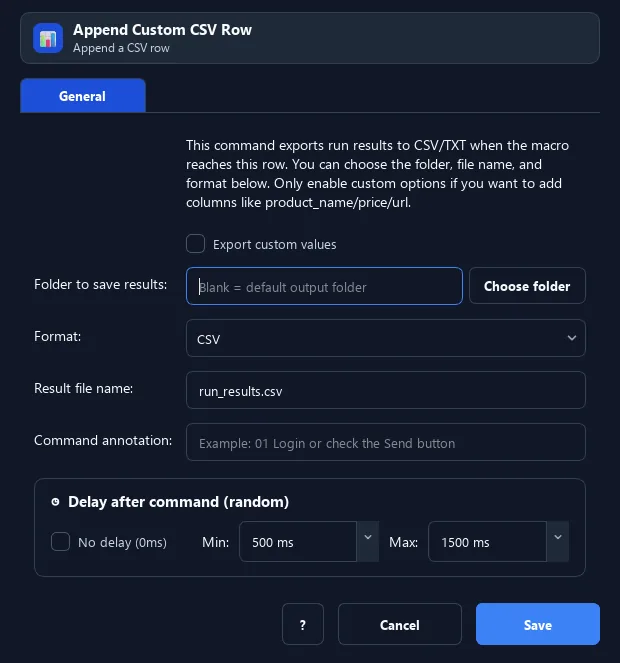
The Append Custom CSV Row command logs one result row per run to a CSV (or TXT) file: macro name, loop number, time, status, error message — plus custom columns if enabled.
Prerequisites#
- Add Append Custom CSV Row to the macro.
- Prepare the data or target that Append Custom CSV Row will use.
Supported modes#
- RunMacro Runner
What it does#
The Append Custom CSV Row command logs one result row per run to a CSV (or TXT) file: macro name, loop number, time, status, error message — plus custom columns if enabled.
Screenshots & video#
When to use it#
- Track batch run outcomes (success/failure).
- Export a per-loop progress report.
- Save result details with custom data.
When not to use it#
- Do not use it instead of a database when transactions, uniqueness, or row updates are required.
Configuration steps#
- Add a File › Append Custom CSV Row command.
- Choose the format (CSV/TXT) and the file path.
- (Optional) enable custom columns and define column = variable. Save.
Every option explained#
Expected result#
After execution, Append Custom CSV Row completes the described action and makes its result available to the next step.
Real example#
Example: batch run log#
- Append Custom CSV Row, CSV format,
run_results.csv. - Enable custom columns:
email={email}. - Each loop logs a row with status and email.
Limitations and failure cases#
- CSV escaping, custom headers/columns, encoding, and concurrent writes can make the file inconsistent.
Tips & common mistakes#
It auto-fills the run status/time — handy for reports with little configuration.
Verification details#
commands/data_source.py
