
Docs
RunMacro Documentation
Create your first robot, then go further as needed.
Clear step-by-step guides to create, run, and improve robots for repetitive computer work.
Wait for a web element to appear/hide (Smart HTML Wait)
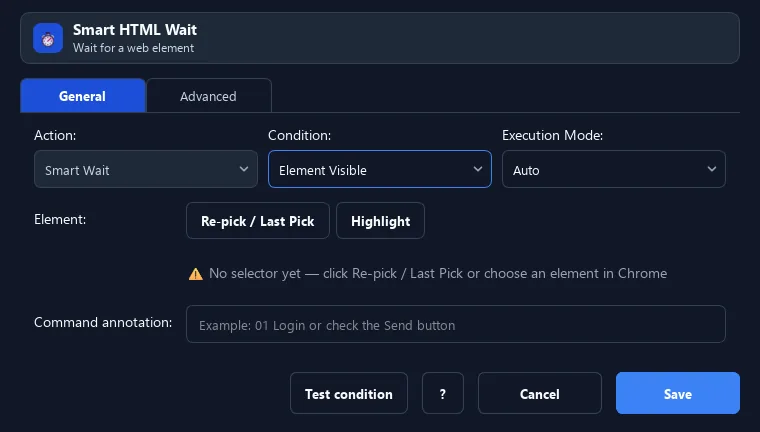
The Smart HTML Wait command pauses until a web element meets a condition: exists, visible, or hidden/gone.
Prerequisites#
- Add Smart HTML Wait to the macro.
- Prepare the data or target that Smart HTML Wait will use.
Supported modes#
- Browser Mode
What it does#
The Smart HTML Wait command pauses until a web element meets a condition: exists, visible, or hidden/gone. It waits at the right moment on slow pages instead of a fixed delay.
Screenshots & video#
When to use it#
- Wait for a button/field to appear before acting.
- Wait for a loading spinner to disappear.
- Sync with dynamically loaded pages (AJAX/SPA).
When not to use it#
- Do not use it when readiness cannot be represented by a DOM element/attribute or no reasonable timeout exists.
Configuration steps#
- Pick the element selector to wait for.
- Add a Smart HTML Wait command, choose the condition: Exists / Visible / Hidden.
- Set the timeout and poll interval. Save.
Every option explained#
Expected result#
After execution, Smart HTML Wait completes the described action and makes its result available to the next step.
Real example#
Example: wait for a "Confirm" button then click#
- Smart HTML Wait the Confirm button selector, condition Visible, timeout 30s.
- Smart HTML Click the same selector.
Limitations and failure cases#
- A stale selector, wrong iframe context, or poor timeout can cause false timeouts or wasted waits.
Tips & common mistakes#
Use Wait before Click/Type steps on dynamic pages to avoid "element not found" errors.
Verification details#
commands/smart_html.py
