
Docs
RunMacro Documentation
Create your first robot, then go further as needed.
Clear step-by-step guides to create, run, and improve robots for repetitive computer work.
Extract data with Regex into a variable in RunMacro
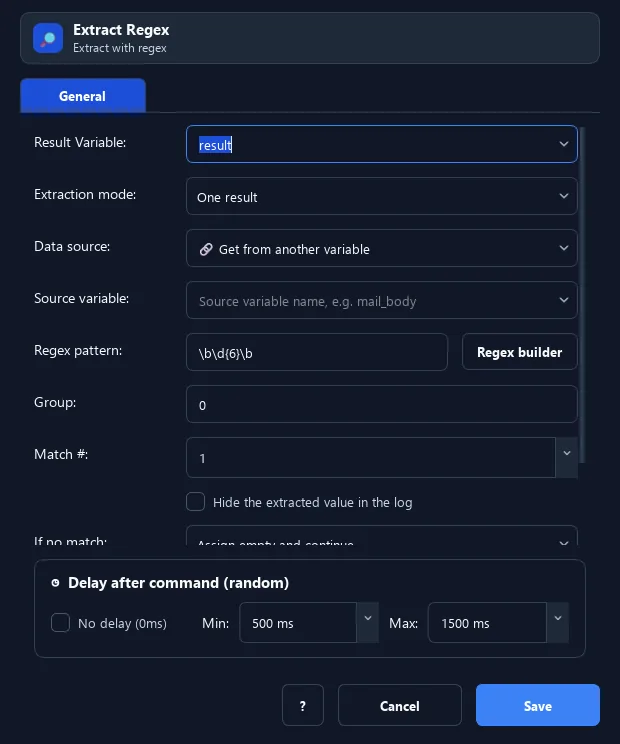
The Extract Regex command uses a regular expression to pull a piece of data (OTP, email, number...) from a variable, text, or the clipboard, then stores it in a variable.
Prerequisites#
- Add Extract Regex to the macro.
- Prepare the data or target that Extract Regex will use.
Supported modes#
- Desktop Mode
- Browser Mode — Runs in the background through Chrome CDP: when the source is the clipboard, the command reads RunMacro’s virtual clipboard instead of the system clipboard.
- RunMacro Runner
What it does#
The Extract Regex command uses a regular expression to pull a piece of data (OTP, email, number...) from a variable, text, or the clipboard, then stores it in a variable.
Screenshots & video#
When to use it#
- Grab a 6-digit OTP from a message/email.
- Pull an email or phone number from a block of text.
- Isolate the needed data before using it.
When not to use it#
- Do not use it for structured JSON/CSV/HTML or an untested regex.
Configuration steps#
- Add a Variables › Extract Regex command.
- Choose the source (Variable / Text / Clipboard) and enter the source value.
- Enter the regex pattern (e.g.
\d{6}for 6 digits) and the result variable. - (Optional) choose the group/match index. Save.
Every option explained#
Expected result#
After execution, Extract Regex completes the described action and makes its result available to the next step.
Real example#
Example: extract a 6-digit OTP from the clipboard#
- Copy the message containing the OTP.
- Extract Regex: source Clipboard, pattern
\d{6}→ variableotp. - Use
{otp}to fill the code field.
Limitations and failure cases#
- An invalid pattern, group, or match index yields no result; Extract All creates numbered and count variables.
Tips & common mistakes#
Test the pattern on an online regex tool first to be sure it matches the right part.
Verification details#
commands/variables.py
