
Docs
RunMacro Documentation
Create your first robot, then go further as needed.
Clear step-by-step guides to create, run, and improve robots for repetitive computer work.
Click by coordinates on an extension popup (CDP)
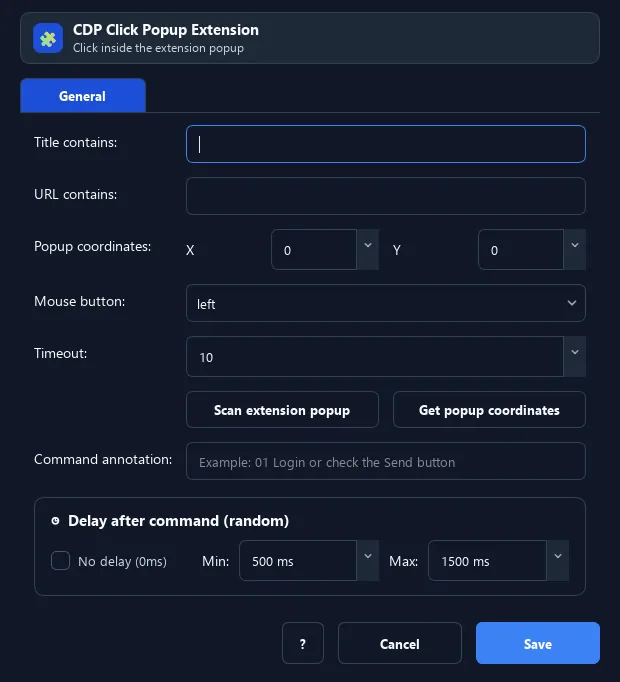
The Click Extension Popup command finds an extension popup window (by title/URL) then clicks at X, Y inside it.
Prerequisites#
- Add Click Extension Popup to the macro.
- Prepare the data or target that Click Extension Popup will use.
Supported modes#
- Browser Mode
What it does#
The Click Extension Popup command finds an extension popup window (by title/URL) then clicks at X, Y inside it. Useful when the popup is hard to target by selector.
Screenshots & video#
When to use it#
- Click Confirm/Approve on a wallet popup when there is no selector.
- Quickly act on a popup with a fixed layout.
When not to use it#
- Do not use it with unstable popup selectors or inaccessible content contexts.
Configuration steps#
- Add Browser › Click Extension Popup.
- Enter Title/URL contains to match the popup and the X, Y to click.
- Choose the mouse button and timeout. Save.
Every option explained#
Expected result#
After execution, Click Extension Popup completes the described action and makes its result available to the next step.
Real example#
Example: confirm a transaction#
- Click Extension Popup: URL contains
notification, X=210, Y=560 (Confirm button). - Delay 1000ms then continue.
Limitations and failure cases#
- Click can immediately close the popup; DOM changes, iframe/shadow context, and timing can stale the selector.
Tips & common mistakes#
Fixed coordinates break when the popup resizes. If the popup has selectors, prefer Select Popup + Smart HTML over coordinate clicks.
Verification details#
commands/browser.py
