
Docs
RunMacro Documentation
Create your first robot, then go further as needed.
Clear step-by-step guides to create, run, and improve robots for repetitive computer work.
Select an extension popup target to act on (CDP)
The Select Extension Popup command finds an extension popup window (by title/URL contains, or popup keywords like notification/confirm/approval) and switches CDP focus to it.
Prerequisites#
- Add Select Extension Popup to the macro.
- Prepare the data or target that Select Extension Popup will use.
Supported modes#
- Browser Mode
What it does#
The Select Extension Popup command finds an extension popup window (by title/URL contains, or popup keywords like notification/confirm/approval) and switches CDP focus to it. After this, Smart HTML/click commands act on that popup.
Screenshots & video#
When to use it#
- Confirm a transaction on a crypto wallet popup.
- Act on an extension approval/connect window.
- Ensure following commands target the popup, not the main tab.
When not to use it#
- Do not use it before the popup opens or when the extension uses a page/service worker instead of a popup target.
Configuration steps#
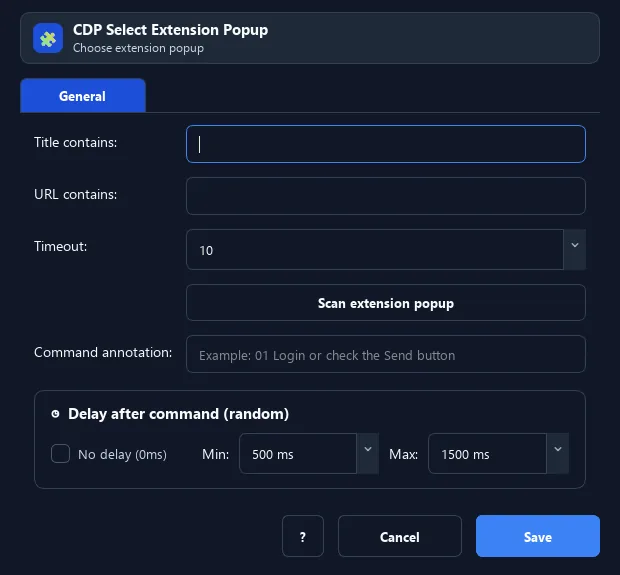
- Once the extension popup appears, add Browser › Select Extension Popup.
- Enter Title contains or URL contains to match the right popup.
- Set a timeout (seconds) to wait for the popup. Save.
Every option explained#
Expected result#
After execution, Select Extension Popup completes the described action and makes its result available to the next step.
Real example#
Example: select a confirm popup#
- Select Extension Popup: URL contains
notification. - Smart HTML › Click the "Confirm" button on the popup.
- Continue the script.
Limitations and failure cases#
- Popup targets are short-lived and can close on blur; multiple popups/extensions make selection ambiguous.
Tips & common mistakes#
Unlike Click Popup (coordinate-based), this only switches focus — then use Smart HTML to act by selector, which is more reliable.
Verification details#
commands/browser.py
