
Docs
RunMacro Documentation
Create your first robot, then go further as needed.
Clear step-by-step guides to create, run, and improve robots for repetitive computer work.
Mouse button down & up (drag) in RunMacro
Mouse Button presses or releases one button as a separate event for controlled drag sequences.
Prerequisites#
- The target application is ready to receive mouse events.
- The coordinates and button action are configured.
Supported modes#
- Desktop Mode
- Browser Mode — Runs in the background through Chrome CDP: the command dispatches a mouse-down or mouse-up event into the page at viewport coordinates.
What it does#
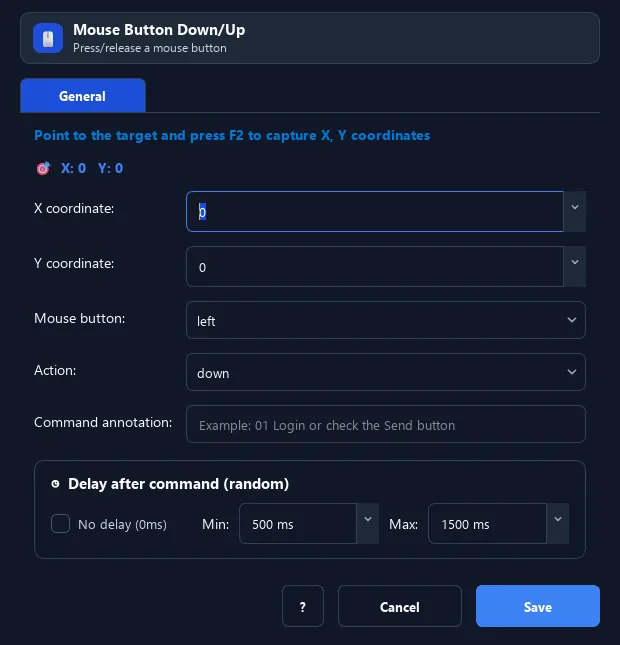
The Mouse Button command lets you press (Down) or release (Up) a single mouse button — unlike Click which presses and releases at once. Combine steps to build drag & drop.
Screenshots & video#
When to use it#
- Drag & drop: Down at A → Move to B → Up at B.
- Hold the button to select/highlight a region.
- Split press and release for precise control.
When not to use it#
- Only an immediate click is needed; use Mouse Click instead.
- The workflow cannot guarantee matching Down and Up events.
Configuration steps#
- Add a Mouse › Mouse Button command.
- Choose the action: Down (press) or Up (release).
- Choose the button: Left / Right / Middle.
- Set the
X, Ycoordinates withF2. - Save. For drag & drop, create 3 steps: Button Down → Mouse Move → Button Up.
Every option explained#
Expected result#
The selected mouse button is pressed or released at the configured coordinates.
Real example#
Example: drag and drop an icon#
- Mouse Button Down (left) at the icon.
- Mouse Move to the destination.
- Mouse Button Up (left) at the destination to drop.
Limitations and failure cases#
- Down and Up should be paired to avoid an unintended held state.
- Coordinates depend on layout and window position.
Tips & common mistakes#
Always pair every Down with an Up, otherwise the button stays stuck in the held state.
Add a short Wait between Down → Move → Up for a more reliable drag.
Verification details#
commands/mouse.py
