
Docs
RunMacro Documentation
Create your first robot, then go further as needed.
Clear step-by-step guides to create, run, and improve robots for repetitive computer work.
Generate a random password in RunMacro
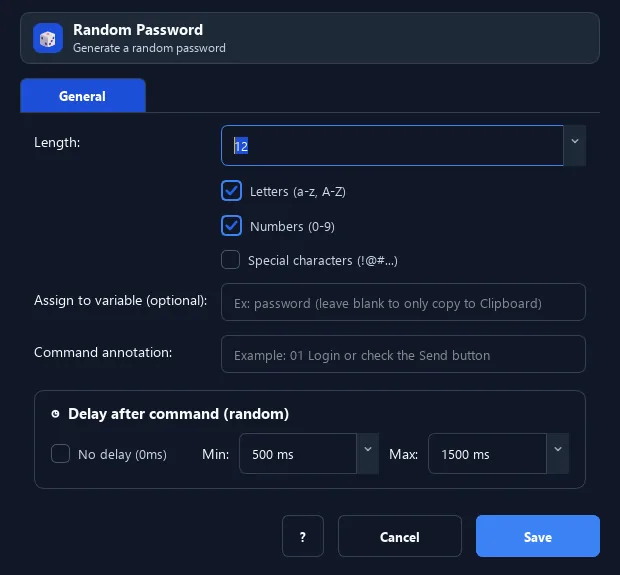
The Random Password command generates a random password of a set length, optionally with letters (guaranteed upper and lower), digits, and special characters.
Prerequisites#
- Add Random Password to the macro.
- Prepare the data or target that Random Password will use.
Supported modes#
- RunMacro Runner
What it does#
The Random Password command generates a random password of a set length, optionally with letters (guaranteed upper and lower), digits, and special characters. The result goes to a variable or clipboard.
Screenshots & video#
When to use it#
- Create a strong password when signing up.
- Generate a different password per account.
- Combine with saving to a file to record sign-up info.
When not to use it#
- Do not use it as a secrets manager or before checking the destination password policy.
Configuration steps#
- Add a Random › Random Password command.
- Set the length and choose components: letters / digits / special.
- (Optional) enter a result variable. Save.
Every option explained#
Expected result#
After execution, Random Password completes the described action and makes its result available to the next step.
Real example#
Example: a 12-char mixed password#
- Random Password, length 12, letters + digits + special on.
- Variable
pwd. - Fill
{pwd}in the password field and record it if needed.
Limitations and failure cases#
- Output is placed on the clipboard; short lengths may not satisfy every character class and there is no secure store.
Tips & common mistakes#
Save username + password to a file with Save Ref to TXT so you keep the sign-up info.
Verification details#
commands/random_cmd.py
