
Docs
RunMacro Documentation
Create your first robot, then go further as needed.
Clear step-by-step guides to create, run, and improve robots for repetitive computer work.
Open an extension page in background Chrome (CDP)
The Open Extension command navigates background Chrome to an extension internal page, of the form chrome-extension://<ID>/<path> (e.g.
Prerequisites#
- Add Open Extension to the macro.
- Prepare the data or target that Open Extension will use.
Supported modes#
- Browser Mode
What it does#
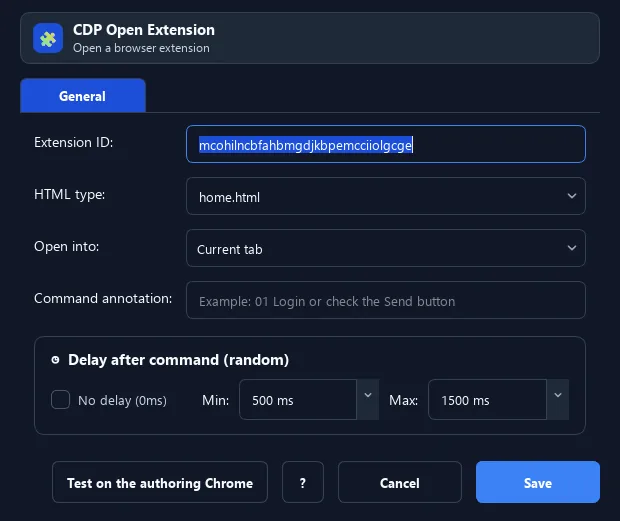
The Open Extension command navigates background Chrome to an extension internal page, of the form chrome-extension://<ID>/<path> (e.g. home.html, popup.html). Often used to open a wallet/extension UI and automate it.
Screenshots & video#
When to use it#
- Open an extension UI (crypto wallet, cookie helper…).
- Automatically go to an extension settings page.
- Prepare an extension page before clicking/typing.
When not to use it#
- Do not open an uninstalled/untrusted extension or without the correct Chrome profile and extension ID.
Configuration steps#
- Get the extension ID (in chrome://extensions with Developer mode on).
- Add Browser › Open Extension, enter the ID and the page path (default
home.html). - Choose current/new tab. Save.
Every option explained#
Expected result#
After execution, Open Extension completes the described action and makes its result available to the next step.
Real example#
Example: open a wallet UI#
- Open Extension with the wallet ID and path
home.html(new tab). - Delay 1500ms.
- Use Smart HTML to type the unlock password.
Limitations and failure cases#
- Extension ID, target URL, and profile permissions determine results; Chrome may not create a target if disabled.
Tips & common mistakes#
A wrong ID or an uninstalled extension leads to a blank/error page. Verify the ID in chrome://extensions first.
Verification details#
commands/browser.py
