
Docs
RunMacro Documentation
Create your first robot, then go further as needed.
Clear step-by-step guides to create, run, and improve robots for repetitive computer work.
Save clipboard content to a TXT file in RunMacro
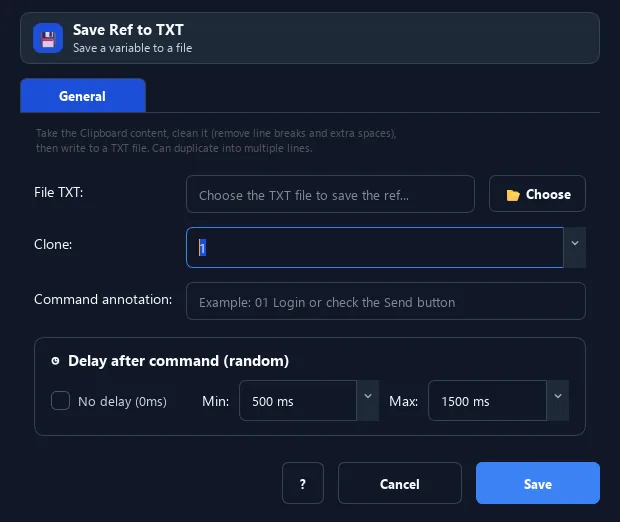
The Save Ref to TXT command takes the current clipboard content, cleans it (into one line, trimming extra spaces), then appends it to the end of a TXT file.
Prerequisites#
- Add Save Ref to TXT to the macro.
- Prepare the data or target that Save Ref to TXT will use.
Supported modes#
- RunMacro Runner
What it does#
The Save Ref to TXT command takes the current clipboard content, cleans it (into one line, trimming extra spaces), then appends it to the end of a TXT file. It can duplicate it into several identical lines.
Screenshots & video#
When to use it#
- Record freshly created account info (username, password).
- Save a captured result for later.
- Accumulate data across runs into one file.
When not to use it#
- Do not use it for structured records or sensitive data requiring encryption.
Configuration steps#
- Make sure the clipboard holds the content to save.
- Add a Random › Save Ref to TXT command and choose the target file.
- (Optional) set the duplicate count. Save.
Every option explained#
Expected result#
After execution, Save Ref to TXT completes the described action and makes its result available to the next step.
Real example#
Example: save the created account#
- Set Clipboard =
{email}|{password}. - Save Ref to TXT →
accounts.txt. - Each sign-up appends a line of info.
Limitations and failure cases#
- It appends text and may normalize it to one line; directory permissions and concurrent writes affect results.
Tips & common mistakes#
Combine Random Username/Password + Save Ref to auto-record every created account.
Verification details#
commands/random_cmd.py
