
Docs
RunMacro Documentation
Create your first robot, then go further as needed.
Clear step-by-step guides to create, run, and improve robots for repetitive computer work.
Write text to a file in RunMacro
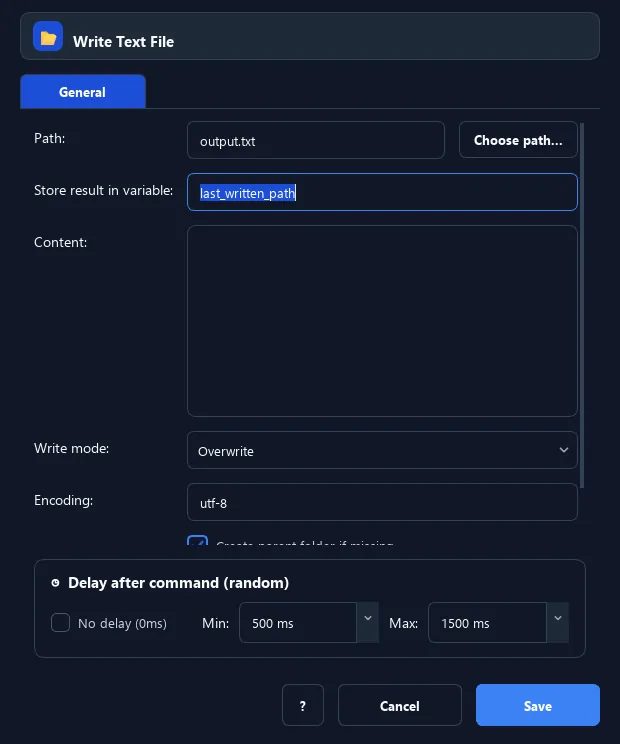
Write Text File writes content (with variables) to a file, choosing overwrite or create-new, encoding, and auto-create parents.
Prerequisites#
- The file path is resolved and the parent exists or Create parent is enabled.
- The process can create or overwrite the file under the selected mode.
Supported modes#
- Desktop Mode — Operates on the local file system.
- Browser Mode
What it does#
The Write Text File command writes your content (with optional variables) to a file. Choose overwrite or create-new (errors if it exists), set the encoding, and auto-create parent folders. Overwrite uses a safe write (temp file then atomic replace).
Screenshots & video#
When to use it#
- Export a processing result to a file.
- Save content composed from variables.
- Generate a config/script file from a template.
When not to use it#
- You want to append lines to a log — use Append to Text File or Log Message.
Configuration steps#
- Add a File › Write Text File command.
- Enter the file path and the content (variables allowed).
- Choose the mode: overwrite or create-new.
- (Optional) Set the encoding and enable create parent folders. Save.
Every option explained#
Expected result#
The file holds the written content; the output variable holds the file path.
Real example#
Example: export a result to a file#
- Write Text File: path
out/result.txt, contentResult: {result}, mode = overwrite, enable Create parent.
Limitations and failure cases#
- Create-new mode errors if the file already exists.
Tips & common mistakes#
Overwrite replaces the old content. Use "create-new" if you must not clobber an existing file.
To append to the end of a file instead of overwriting, use the Append to Text File command.
Verification details#
commands/filesystem.py
