
Docs
RunMacro Documentation
Create your first robot, then go further as needed.
Clear step-by-step guides to create, run, and improve robots for repetitive computer work.
Type a random number directly in RunMacro
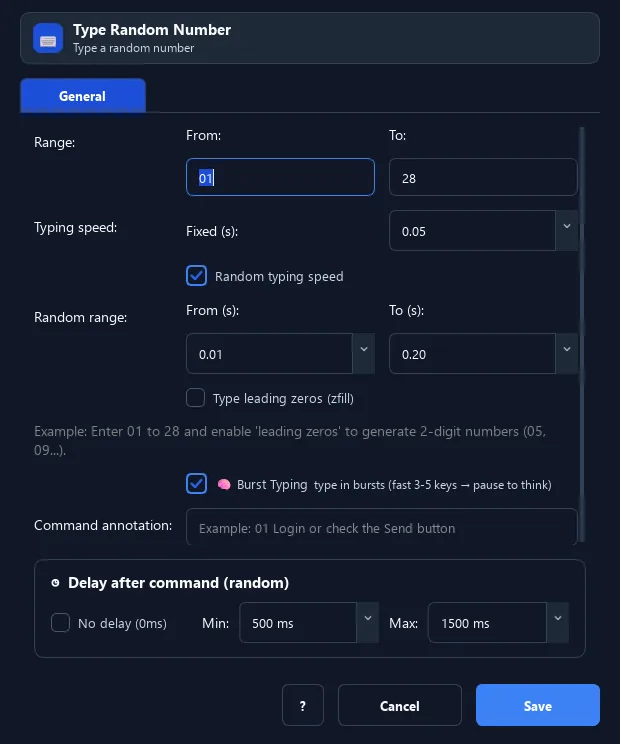
The Type Random Number command generates a random integer in a range and types it directly into the focused field (no clipboard), at a natural-timing speed.
Prerequisites#
- Add Type Random Number to the macro.
- Prepare the data or target that Type Random Number will use.
Supported modes#
- RunMacro Runner
What it does#
The Type Random Number command generates a random integer in a range and types it directly into the focused field (no clipboard), at a natural-timing speed. It can add leading zeros (e.g. 05).
Screenshots & video#
When to use it#
- Quickly fill a random number (e.g. day 01–28) into a field.
- Need a 2-digit format (with leading zero).
- Type like a human instead of an instant paste.
When not to use it#
- Do not use it when the number must be reused; generate it into a variable first.
Configuration steps#
- Click the number field.
- Add a Random › Type Random Number command.
- Enter min, max; (optional) enable leading zeros and random speed.
- Save.
Every option explained#
Expected result#
After execution, Type Random Number completes the described action and makes its result available to the next step.
Real example#
Example: type a random day 01–28#
- Click the "Day" field.
- Type Random Number, min=1, max=28, leading zeros on.
- RunMacro types e.g.
07.
Limitations and failure cases#
- It types into the focused target; wrong focus sends it elsewhere and padding follows configuration.
Tips & common mistakes#
Unlike Random Integer (to clipboard), this types directly — remember to click the field first.
Verification details#
commands/random_cmd.py
