
Docs
RunMacro Documentation
Create your first robot, then go further as needed.
Clear step-by-step guides to create, run, and improve robots for repetitive computer work.
Read file or folder metadata in RunMacro
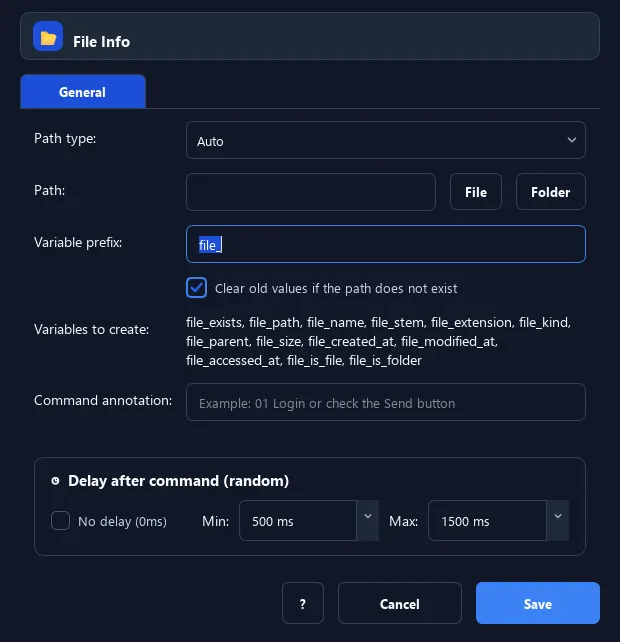
File Info reads metadata (exists, size, name, times...) of a file/folder into a group of prefixed variables.
Prerequisites#
- The path exists (otherwise branch on the exists flag).
Supported modes#
- Desktop Mode — Operates on the local file system.
- Browser Mode
What it does#
The File Info command reads metadata of a file/folder into a group of variables sharing a prefix (e.g. file_): exists, path, name, extension, kind, parent, size, created/modified/accessed times, and is_file/is_folder flags.
Screenshots & video#
When to use it#
- Branch on a file size or modified time.
- Get the name/extension to build another file name.
- Check whether a path exists and is a file or folder.
When not to use it#
- You only need existence — IF File Exists is simpler.
Configuration steps#
- Add a File › File Info command.
- Enter the path to read.
- (Optional) Restrict the kind (auto/file/folder).
- (Optional) Change the output variable prefix (default
file_). Save.
Every option explained#
Expected result#
The prefixed variable group is filled with the path metadata.
Real example#
Example: only process non-empty files#
- File Info: path
{current_file}, prefixf_. - Use IF Variable to compare
{f_size}and branch.
Limitations and failure cases#
- Size is a byte count as a string; convert to a number for math.
Tips & common mistakes#
Time variables use ISO format (e.g. 2026-07-24T10:30:00), convenient for string comparison.
Verification details#
commands/filesystem.py
