
Docs
RunMacro Documentation
Create your first robot, then go further as needed.
Clear step-by-step guides to create, run, and improve robots for repetitive computer work.
Generate a 2FA OTP code from a secret in RunMacro
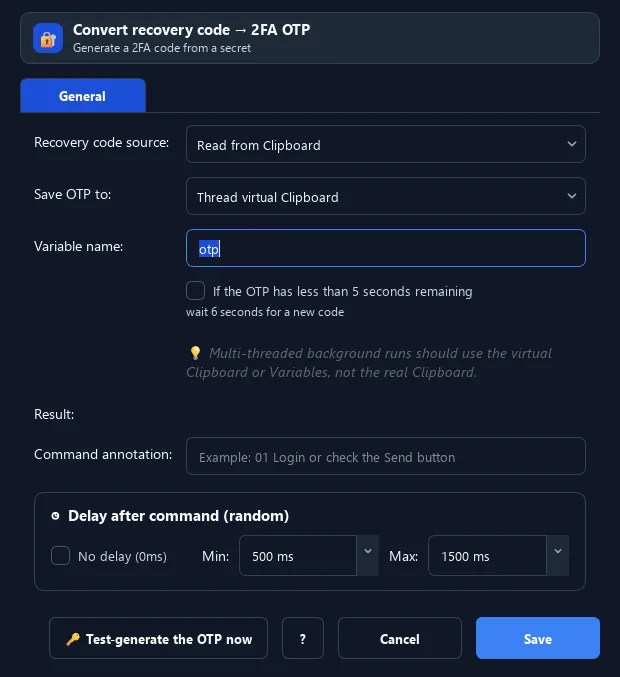
The Convert 2FA command generates a two-factor OTP code (like Google Authenticator) from a 2FA secret key.
Prerequisites#
- Add Convert 2FA to the macro.
- Prepare the data or target that Convert 2FA will use.
Supported modes#
- Desktop Mode
- Browser Mode — Runs in the background through Chrome CDP: when the seed comes from the clipboard, the command reads RunMacro’s virtual clipboard instead of the system clipboard.
- RunMacro Runner
What it does#
The Convert 2FA command generates a two-factor OTP code (like Google Authenticator) from a 2FA secret key. The key comes from the clipboard or typed input; the code goes to the virtual clipboard, real clipboard, or a variable.
Screenshots & video#
When to use it#
- Auto-fill a 2FA code at account login.
- Process many accounts with 2FA enabled.
- Generate OTP from a secret stored in a Sheet/file.
When not to use it#
- Do not use an untrusted 2FA seed or when the system clock is not synchronized.
Configuration steps#
- Add a Code › Convert 2FA command.
- Choose the secret source: from the clipboard or typed (secret key).
- Choose the output: virtual clipboard / variable / real clipboard.
- Use Paste from Clipboard or the variable to fill the code. Save.
Every option explained#
Expected result#
After execution, Convert 2FA completes the described action and makes its result available to the next step.
Real example#
Example: fill a 2FA code at login#
- Set Clipboard = the account 2FA secret (or from a Sheet).
- Convert 2FA, source Clipboard, output to variable
otp. - Click the code field, Type Text
{otp}.
Limitations and failure cases#
- TOTP depends on secret and time; clock drift or a wrong seed produces invalid codes, and the secret is sensitive.
Tips & common mistakes#
The
pyotp library must be installed for code generation (it warns if missing).The OTP changes about every 30 seconds — generate and use it right away to avoid expiry.
Verification details#
commands/code.py
