
Docs
RunMacro Documentation
Create your first robot, then go further as needed.
Clear step-by-step guides to create, run, and improve robots for repetitive computer work.
Generate a random username in RunMacro
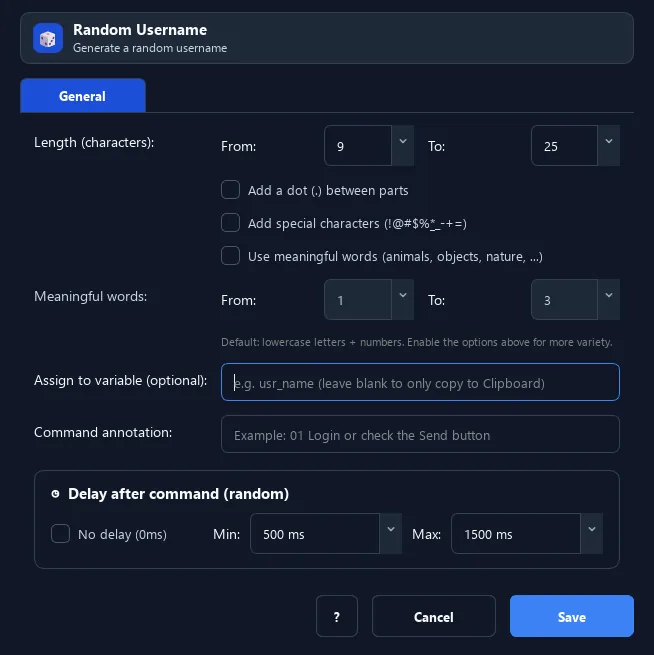
The Random Username command generates a random username from real names or meaningful words, at a length you set.
Prerequisites#
- Add Random Username to the macro.
- Prepare the data or target that Random Username will use.
Supported modes#
- RunMacro Runner
What it does#
The Random Username command generates a random username from real names or meaningful words, at a length you set. It can add dots, special characters, and digits. The result goes to a variable or the clipboard.
Screenshots & video#
When to use it#
- Register many accounts with different usernames.
- Create unique login names within a length requirement.
- Generate test data for a sign-up form.
When not to use it#
- Do not use it when a username must represent a person or be checked online.
Configuration steps#
- Add a Random › Random Username command.
- Set the min/max length.
- (Optional) enable dots, special characters, or use words.
- (Optional) enter a result variable. Save.
Every option explained#
Expected result#
After execution, Random Username completes the described action and makes its result available to the next step.
Real example#
Example: a 10-14 char username with dots#
- Random Username, min=10, max=14, dots on.
- Variable
uname. - Fill
{uname}in the sign-up field.
Limitations and failure cases#
- It does not check availability; the destination service may enforce different character rules.
Tips & common mistakes#
If you need a username derived from a specific name, use Generate Username from Name.
Verification details#
commands/random_cmd.py
