
Docs
RunMacro Documentation
Create your first robot, then go further as needed.
Clear step-by-step guides to create, run, and improve robots for repetitive computer work.
Exit a sub-macro and jump to a parent label in RunMacro
The Goto Parent File command is for scripts that call a sub-macro.
Prerequisites#
- Add Goto Parent File to the macro.
- Prepare the data or target that Goto Parent File will use.
Supported modes#
- RunMacro Runner
What it does#
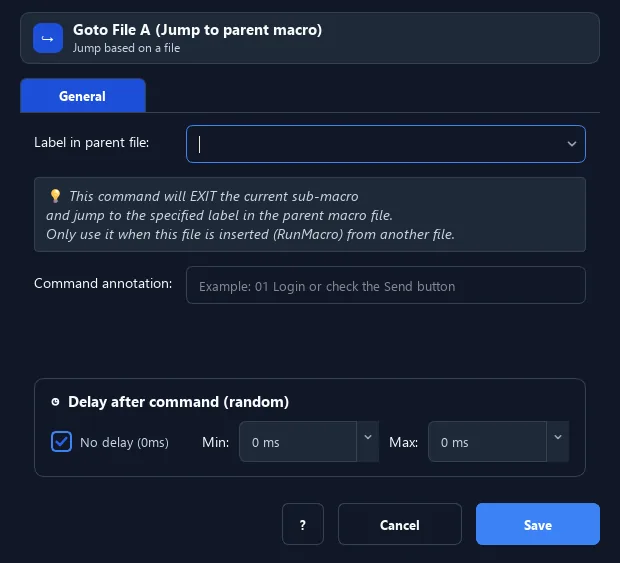
The Goto Parent File command is for scripts that call a sub-macro. It exits the running sub-macro and jumps to a label in the parent macro. It enables flexible navigation across files.
Screenshots & video#
When to use it#
- From a sub-macro, return to a point in the parent macro.
- End a sub-macro early on a condition.
- Build multi-level scripts that reuse sub-files.
When not to use it#
- Do not use it outside a child macro or when a normal return to the caller is sufficient.
Configuration steps#
- Make sure the parent file has a target Label.
- In the sub-macro, add a Flow › Goto Parent File command.
- Enter the parent-file target label name. Save.
Every option explained#
Expected result#
After execution, Goto Parent File completes the described action and makes its result available to the next step.
Real example#
Example: sub-macro reports an error to the parent#
- Parent file has Label
handle_error. - In the sub-macro, on error, use Goto Parent File →
handle_error. - The flow exits the sub-macro and continues in the parent.
Limitations and failure cases#
- The command requires a parent frame and an existing parent label; it couples the child to the caller label names and structure.
Tips & common mistakes#
Only works when the sub-macro is called from a parent (via Insert .pmacro/.qmacro).
Verification details#
commands/control_flow.py
