
Docs
RunMacro Documentation
Create your first robot, then go further as needed.
Clear step-by-step guides to create, run, and improve robots for repetitive computer work.
Automate clicks by image recognition in RunMacro
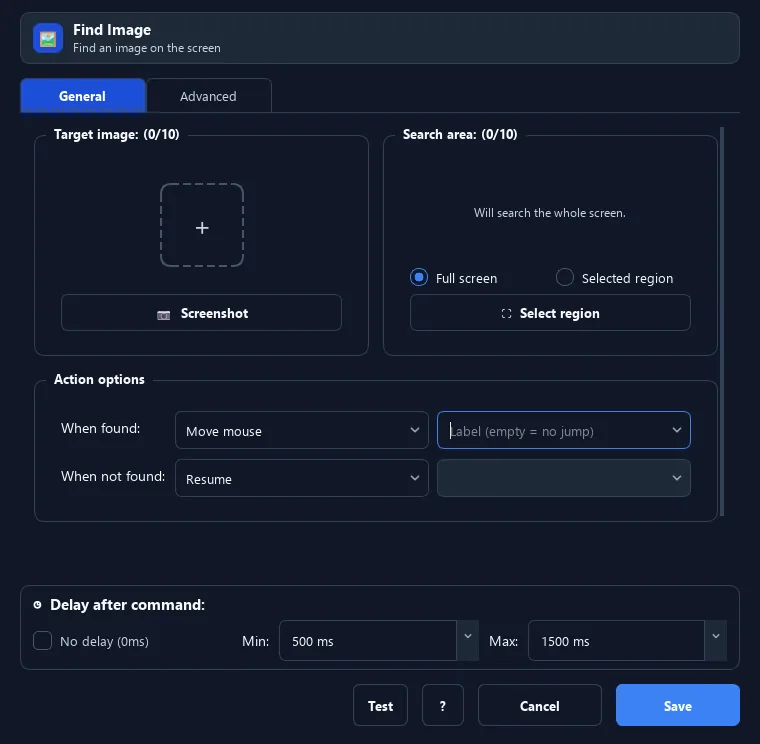
Find Image searches for a visual template in a screen region, retries as configured, and acts when it finds a match.
Prerequisites#
- A clear sample image matches the target interface.
- The target screen or Browser tab is ready.
Supported modes#
- Desktop Mode
- Browser Mode
What it does#
The Find Image command screenshots the screen and checks whether a sample image (a button, an icon...) appears. If found, RunMacro can move to it, click it, or branch on the result. It is the reliable way to click when element positions shift.
Screenshots & video#
When to use it#
- A button/icon moves around, so a fixed coordinate click will not work.
- Wait for an image to appear before acting (e.g. a "Continue" button).
- Branch: if the image is found do A, otherwise do B.
- Automate games/apps that have no selectors.
When not to use it#
- The interface has a stable HTML selector and should be targeted through the DOM.
- The sample changes substantially between runs.
Configuration steps#
- Add an Image › Find Image command.
- Add one or more sample images (crop the button/icon to find).
- (Optional) draw a search region for faster, more accurate matching.
- Choose the action when found: none / move / click / double-click / right click.
- Set retries and delay between tries if the image appears slowly.
- Set IF/ELSE labels to branch. Save.
Every option explained#
Expected result#
RunMacro reports whether the image was found and performs the configured branch or action.
Real example#
Example: wait for a "Download" button then click#
- Crop the "Download" button as the sample image.
- Add Find Image, choose the click action.
- Set 25 retries, 200ms between tries.
- Point the ELSE label to a fallback when the button is missing.
Limitations and failure cases#
- Resolution, DPI, theme, and image quality affect matching.
- Full-screen searches can be slower than a restricted region.
Tips & common mistakes#
Crop the sample tight to the distinctive part (icon/text) — avoid changing backgrounds for stable matching.
Set a search region to scan much faster and reduce false matches.
If confidence is too high and the resolution/theme changes, it may not match — loosen confidence a bit or use the scale range.
Verification details#
commands/capture.py
