
Docs
RunMacro Documentation
Create your first robot, then go further as needed.
Clear step-by-step guides to create, run, and improve robots for repetitive computer work.
Check whether a CDP target exists (tab/extension)
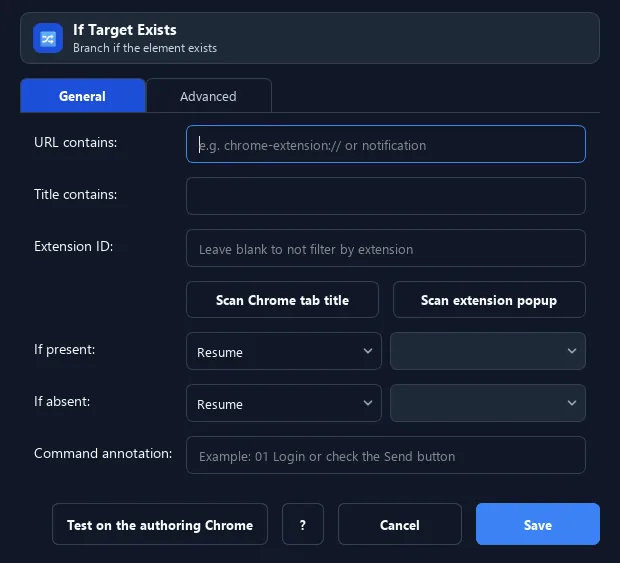
The IF Target Exists command scans background Chrome targets (tabs and extension pages) and checks if any matches: URL contains, Title contains, or Extension ID.
Prerequisites#
- Add IF Target Exists to the macro.
- Prepare the data or target that IF Target Exists will use.
Supported modes#
- Browser Mode
What it does#
The IF Target Exists command scans background Chrome targets (tabs and extension pages) and checks if any matches: URL contains, Title contains, or Extension ID. If YES → jump to the IF Label, if NO → the ELSE Label. It retries several times.
Screenshots & video#
When to use it#
- Check whether an extension confirm popup has appeared.
- Wait for a specific tab to show up before acting.
- Branch depending on whether a target page is open.
When not to use it#
- Do not use an instantaneous check to wait for target creation; retry with a timeout.
Configuration steps#
- In Browser Mode (CDP), add Browser › IF Target Exists.
- Fill one or more conditions: URL contains / Title contains / Extension ID.
- Set an IF Label and ELSE Label, adjust retry count and delay per try. Save.
Every option explained#
Expected result#
After execution, IF Target Exists completes the described action and makes its result available to the next step.
Real example#
Example: wait for a wallet confirm popup#
- IF Target Exists: extension ID = wallet ID, URL contains
notification. - IF Label → HAS_POPUP: select & click Confirm.
- ELSE Label → NO_POPUP: skip.
Limitations and failure cases#
- A target can appear/disappear immediately after the check; broad title/URL patterns can overmatch.
Tips & common mistakes#
Increase retries/delay if the popup is slow to appear. Combine multiple conditions for a more precise match.
Verification details#
commands/browser.py
