
Docs
RunMacro Documentation
Create your first robot, then go further as needed.
Clear step-by-step guides to create, run, and improve robots for repetitive computer work.
Auto-paste clipboard content in RunMacro
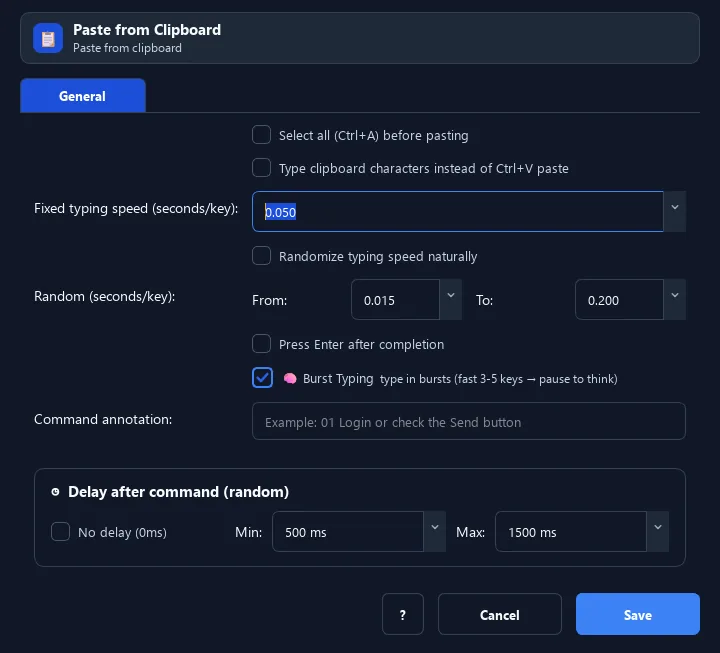
The Paste from Clipboard command pastes whatever is currently in the clipboard (what you or a previous step copied) into the focused field.
Prerequisites#
- Add Paste from Clipboard to the macro.
- Prepare the data or target that Paste from Clipboard will use.
Supported modes#
- Desktop Mode
- Browser Mode — Runs in the background through Chrome CDP: the command pastes from RunMacro’s virtual clipboard into the page and leaves the system clipboard untouched.
What it does#
The Paste from Clipboard command pastes whatever is currently in the clipboard (what you or a previous step copied) into the focused field. Unlike Paste Text (fixed content), this uses dynamic clipboard content.
Screenshots & video#
When to use it#
- Copy data in a previous step, then paste it elsewhere.
- Move data between apps via the clipboard.
- Paste content the user just copied.
When not to use it#
- Do not use it when clipboard contents may be stale or the system clipboard must not be changed.
Configuration steps#
- Make sure the clipboard has content (use Copy Text or Set Clipboard first).
- Click the target field.
- Add a Keyboard › Paste from Clipboard command.
- (Optional) enable Select all / Type instead / Press Enter.
- Save.
Every option explained#
Expected result#
After execution, Paste from Clipboard completes the described action and makes its result available to the next step.
Real example#
Example: copy field A, paste into field B#
- Select field A, use Copy Text.
- Click field B.
- Paste from Clipboard to move the content into field B.
Limitations and failure cases#
- Desktop and Browser can use different clipboard stores; select-all/Enter can overwrite or submit unexpectedly.
Tips & common mistakes#
Combine with Copy Text to move data between two apps.
Verification details#
commands/keyboard.py
