
Docs
RunMacro Documentation
Create your first robot, then go further as needed.
Clear step-by-step guides to create, run, and improve robots for repetitive computer work.
Assert a web condition (Smart Assert)
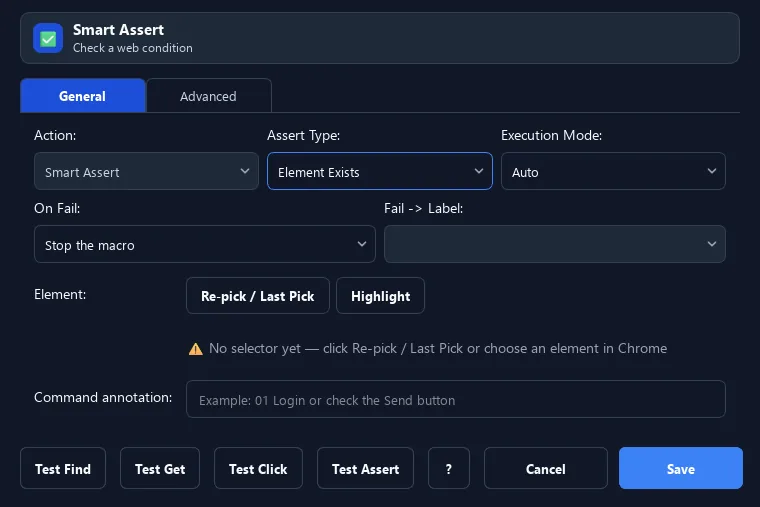
The Smart Assert command verifies a condition (element exists, text/URL/attribute/variable matches) to confirm the expected state.
Prerequisites#
- Add Smart Assert to the macro.
- Prepare the data or target that Smart Assert will use.
Supported modes#
- Browser Mode
What it does#
The Smart Assert command verifies a condition (element exists, text/URL/attribute/variable matches) to confirm the expected state. On failure, you choose: stop, continue, jump to a label, or pause.
Screenshots & video#
When to use it#
- Confirm you reached the right page/state before continuing.
- Check that a previous step succeeded.
- Stop safely when detecting an error mid-run.
When not to use it#
- Do not use Assert for recoverable cases better handled by IF/ELSE; it is for mandatory conditions.
Configuration steps#
- Add a Smart Assert command.
- Choose the assertion type (element exists, text contains, URL contains, variable...).
- Enter the expected value if needed.
- Choose the on-fail action: stop / continue / jump / pause. Save.
Every option explained#
Expected result#
After execution, Smart Assert completes the described action and makes its result available to the next step.
Real example#
Example: verify a successful login#
- Smart Assert, type URL contains
/dashboard. - On fail: jump to label
relogin. - On success continue normally.
Limitations and failure cases#
- A failed assertion reports an error according to configuration and does not repair the target; dynamic text/attributes can false-fail.
Tips & common mistakes#
Use Assert at key checkpoints to catch errors early instead of letting the workflow drift.
Verification details#
commands/smart_html.py
