
Docs
RunMacro Documentation
Create your first robot, then go further as needed.
Clear step-by-step guides to create, run, and improve robots for repetitive computer work.
Calculate a math expression into a variable in RunMacro
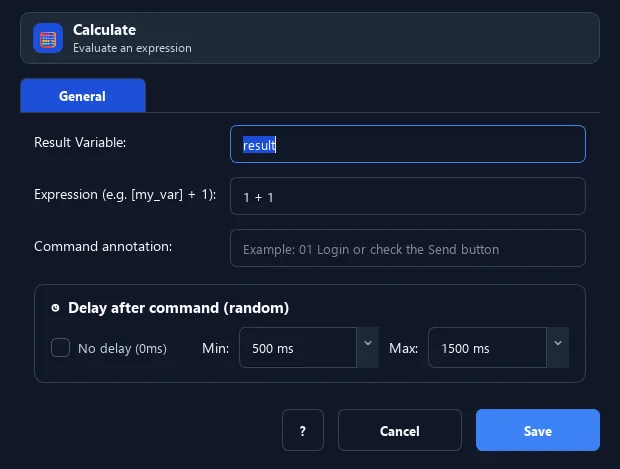
The Calculate command evaluates a math expression (add, subtract, multiply, divide, floor-divide, modulo, exponent) and stores the result in a variable.
Prerequisites#
- Add Calculate to the macro.
- Prepare the data or target that Calculate will use.
Supported modes#
- RunMacro Runner
What it does#
The Calculate command evaluates a math expression (add, subtract, multiply, divide, floor-divide, modulo, exponent) and stores the result in a variable. Reference numeric variables in the expression with [var_name].
Screenshots & video#
When to use it#
- Increment/decrement a counter in a loop.
- Compute a sum, difference, or derived value.
- Process numbers before filling a form.
When not to use it#
- Do not use it for string concatenation or arbitrary Python; use it for supported numeric expressions.
Configuration steps#
- Add a Variables › Calculate command.
- Set the result variable.
- Enter the expression, using
[var_name]for numeric variables (e.g.[count] + 1). - Save.
Every option explained#
Expected result#
After execution, Calculate completes the described action and makes its result available to the next step.
Real example#
Example: increment a counter each loop#
- Declare Variable
count= 0. - In the loop: Calculate
count=[count] + 1. - Use
{count}to show the run count.
Limitations and failure cases#
- Variable syntax uses [name]; malformed expressions, missing variables, or division by zero fail.
Tips & common mistakes#
In expressions, reference variables with
[name] (square brackets), unlike {name} used in text fields.Verification details#
commands/variables.py
