
Docs
RunMacro Documentation
Create your first robot, then go further as needed.
Clear step-by-step guides to create, run, and improve robots for repetitive computer work.
Grab text from a web page in background Chrome (CDP)
The CDP Copy Text command reads text from a web page in Browser Mode (CDP) and stores it in the virtual clipboard or a variable.
Prerequisites#
- The workflow runs in Browser Mode with an active CDP driver.
- Selector source has a valid CSS selector; selection or focused-input source has matching page state.
- The result variable name is valid when storage beyond the virtual clipboard is needed.
Supported modes#
- Browser Mode — Always writes text to the context virtual clipboard and additionally to a variable when configured.
What it does#
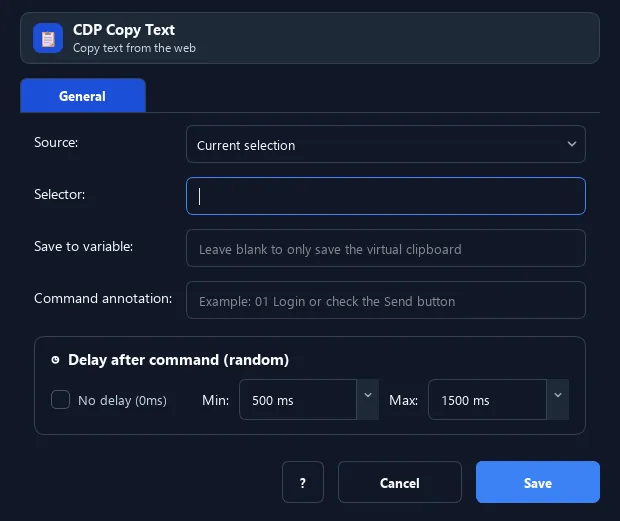
The CDP Copy Text command reads text from a web page in Browser Mode (CDP) and stores it in the virtual clipboard or a variable. The source can be: the current selection, a specific selector, or the focused input. It does not use the real Windows clipboard, so it does not disturb other work.
Screenshots & video#
When to use it#
- Grab a web element content (price, code, status) to process.
- Read data in the background without touching the real clipboard.
- Save text into a variable for a later step.
When not to use it#
- The workflow runs only in Desktop Mode.
- Structured extraction or complex iframe/shadow-DOM handling is required; Smart HTML is more appropriate.
- The selector is unstable or the target is outside the current CDP page context.
Configuration steps#
- In Browser Mode (CDP), add Keyboard › CDP Copy Text.
- Choose the source: selection / selector / focused input.
- For selector, enter the selector; set a result variable if needed. Save.
Every option explained#
Expected result#
Text from the selection, selector, or focused input is written to the virtual clipboard and optionally to the result variable.
Real example#
Example: grab a product price#
- CDP Copy Text: source = selector
.price, variable =price. - Use
{price}in later steps.
Limitations and failure cases#
- The command fails outside Browser Mode or without a CDP driver.
- A missing selector or empty selection can produce an empty string.
- Iframes, shadow DOM, cross-origin content, or dynamically replaced elements may require different targeting.
Tips & common mistakes#
Runs only in Browser Mode (CDP). This is the background version of Copy Text — use it to grab web data without taking the clipboard/mouse.
Verification details#
commands/cdp_clipboard.py
