
RunMacro Documentation
Create your first robot, then go further as needed.
Clear step-by-step guides to create, run, and improve robots for repetitive computer work.
Pick a random line from a TXT file in RunMacro
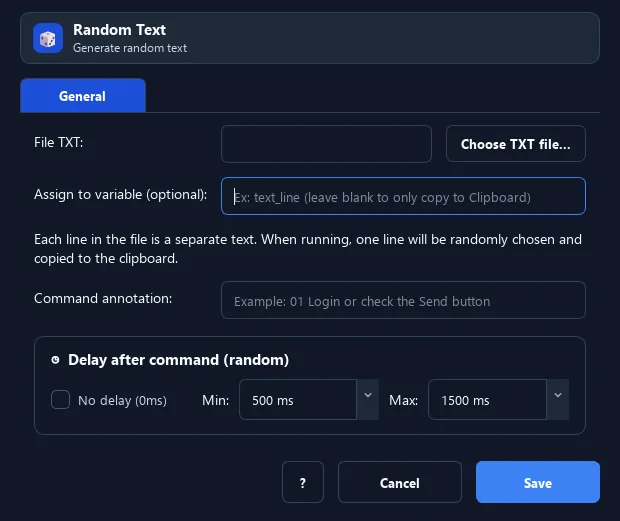
Random Text picks a nonempty line from a TXT file, always writes it to the clipboard, and can also store it in a variable; file or clipboard errors are logged while the workflow continues.
Prerequisites#
- The TXT file exists and the RunMacro account can read it.
- The file contains at least one line longer than zero characters.
- The file path remains valid on the computer that runs the workflow.
- The system clipboard or Browser Mode virtual clipboard is available.
Supported modes#
- RunMacro Runner
What it does#
The Random Text command reads a TXT file, treats every line longer than zero characters as a choice, and randomly selects one line. The chosen line is always written to the clipboard; when a result variable is configured, RunMacro stores an additional copy there. In background Browser Mode, this is the session virtual clipboard instead of the Windows system clipboard.
Screenshots & video#
When to use it#
- Pick a sentence, title, or content template from a long TXT list.
- Feed different data into loop iterations without embedding the full list in the workflow.
- Share one text source across several workflows.
- Put one choice on the clipboard for a later paste command.
When not to use it#
- Do not use it when lines must be consumed in order, without repeats, or marked as used.
- Do not use it for a multi-process queue that needs file locking.
- Do not use a local file when the workflow runs on another computer where that file is not distributed.
Configuration steps#
- Prepare a TXT file with one choice on each line.
- Save it as UTF-8 when possible; RunMacro also tries UTF-8 with BOM, CP1258, and the Windows default encoding.
- Add Random › Random Text and select the file.
- (Optional) enter a result variable when later steps need direct variable access.
- Test the command and paste the clipboard to inspect the result; empty lines are skipped, but a line containing only spaces can still be selected.
- Save the workflow. Each run selects independently, so the same line can appear again.
Every option explained#
Expected result#
When the file is readable and has choices, one line is selected, stored in the configured variable when present, and written to the system or virtual clipboard. With no data or an error, the command logs the relevant message and returns control to the next step.
Real example#
Example: post a random comment#
- Create UTF-8
comments.txtwith one sentence per line. - Select it in Random Text and set the
commentvariable. - The command picks one line and writes it to both
{comment}and the clipboard. - Paste or use the variable in the next step; a later run may select the same sentence again.
Example: missing or empty file#
- Run with a missing path to get the "could not read the TXT file" log.
- Run with no usable lines to get the "TXT file is empty or not selected" log.
- In both cases the workflow continues and Random Text writes no new value.
Limitations and failure cases#
- Selections can repeat, and the file is not changed or stripped of used lines.
- Whitespace-only lines still count as content.
- The final decoding fallback can discard invalid bytes, so UTF-8 is recommended for exact text.
- File-read or clipboard-write errors do not fail the workflow.
Tips & common mistakes#
CR/LF line endings; it does not trim leading or trailing spaces. Clean the file when whitespace matters.Verification details#
commands/random_cmd.py
